Accounting Client Portal Development for Clear WIP and Cleaner Billing
ScaleLabs builds client portals for accounting firms that move work out of email threads and into one secure place for requests, documents, status, and approvals. Give clients a clean view of what’s in progress while your team spends less time chasing files and fixing spreadsheets.
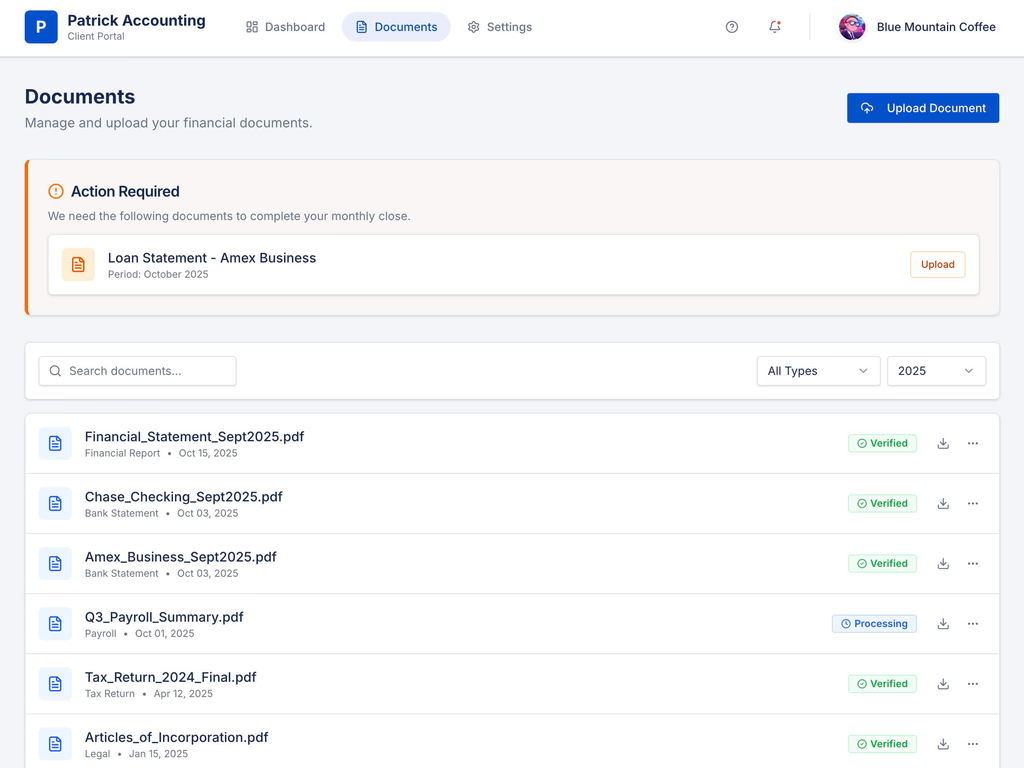
When Your Inbox Becomes the Client Portal
Running engagements through email threads, ad-hoc folders, and spreadsheets feels normal,
until it starts hurting the firm.

Work gets buried in long mail threads
Requests, answers, and file links spread across replies. Staff and partners waste hours rebuilding context before they can move a return, close, or set of accounts forward.

Clients lose track of what you actually need
Clients get multiple “please send X” emails and lose the latest list. They reply out of order, attach files in pieces, and then ask for a summary of what’s still missing.

Billing and WIP reports take too long
When status lives in email, “what’s done, what’s in review, what’s waiting on the client” becomes a manual exercise. That slows billing, delays follow-ups, and hides which work is stuck.
Why Accounting Firms Move to a Dedicated Client Portal
A good client portal for accountants gives each client one place to see what’s open, what’s in progress, and what’s done, while your teams work from a structured workflow instead of scattered channels.

Bring requests, documents, and status together
Each engagement has one clear space for PBC requests, uploads, comments, and approvals. Everyone sees the same list instead of hunting across email and shared drives.
Give clients simple, high-level status
Clients don’t need to see your full practice management system. They want to know: requested, in prep, in review, sent, or filed. An accounting client portal shows this without exposing internal complexity.
Make deadlines feel manageable again
With clear status and missing-item tracking, tax deadlines, monthly closes, and reporting cycles stop feeling like a scramble. Teams can see what’s truly blocked and act early.
Turn the inbox into a support channel, not the workflow
Once the portal holds the actual work, email becomes a pointer, not the system of record. That’s where firms start gaining real capacity.
What We Build Into an Accounting Client Portal
We design client portals for accounting firms to fit your engagement model, monthly accounting, tax, audit, CAS, or advisory—so clients get clarity and your team gets structure.

Client & Entity Dashboard
Give clients a dashboard that shows each entity and engagement at a glance: what’s active, what’s waiting on them, and what’s recently completed.

Document Vault With History
Store bank statements, ledgers, trial balances, receipts, contracts, and reports in one place. Files stay tied to the engagement with a clear history of uploads.
Comment Threads on Each Item or Engagement
Keep questions and clarifications next to the specific document or request so staff don’t have to search email to understand context.
PBC / Request Lists That Stay Updated
Instead of scattered “please send” emails, clients see an organized list of items, due dates, and statuses (not started, in progress, completed, under review).
Approvals, Sign-Offs, and E-Sign Hooks
Let clients approve drafts, management reports, or deliverables in the portal. If needed, we can link out to your existing e-sign tools for signed letters or agreements.
Role-Based Views for Client Contacts
Let owners, finance leads, and other stakeholders see only the entities and engagements that apply to them while keeping internal notes private.
Proof from real accounting client portals work
Running accounting work through email threads and spreadsheets doesn’t just feel messy. It creates delays, review bottlenecks, and hidden costs that get worse as your client list grows.
Regional CAS Firm
- Reduced scattered PBC requests across long email threads
- Centralized project info so teams stop forwarding and chasing
- More time for analysis and advisory work instead of admin cleanup
Year-end & tax team
- High-level status for each return instead of manual WIP spreadsheets
- Clear progress after clients upload documents, without extra follow-ups
- Fewer “what do you still need from us?” emails from busy clients
Audit & assurance group
- Less manual tracking of open requests and missing support
- Better handoffs between staff, seniors, and partners on complex engagements
- A single backbone process that supports growth without overloading the team
See Work-in-Progress Before It Becomes a Billing Problem
Accounting work doesn’t stall overnight—it stalls quietly inside inboxes and spreadsheets. With a well-designed client portal for accountants, each engagement moves through clear stages like Requested, In Preparation, In Review, Ready to Send, and Completed. Partners and managers can see which jobs are stuck, which clients are holding things up, and which engagements are ready to bill, without waiting for a manual report.

Connect the Portal to Your GL and Practice Stack
We build accounting client portal development to work with the systems you already rely on, so teams don’t double-enter data.











Where accounting
client portals pay off fast
Accounting client portals work best when engagements have many moving parts, documents, and deadlines. We build accounting firm's client portal that match your services so clients stay informed without flooding your team with emails.
CAS & outsourced accounting
Recurring weekly or monthly work means constant requests and uploads. An accounting client portal keeps PBC lists, documents, and comments in one place so both sides always know what’s pending and what’s done.

Tax and year-end workflows
During busy season, clients need a clear list of what you need and a simple way to track progress. A client portal for accountants gives them a checklist, due dates, and status so you spend less time chasing and more time preparing returns.

Audit, review, and assurance
Samples, support, and responses move through one structured portal instead of email chains and spreadsheets. An accounting portal makes open items easier to track and gives clients a single place to respond and upload evidence.

Protecting Client Financial Data From Day One
Accounting software with client portal data is sensitive. We design portals with the access rules and visibility controls that make your compliance and IT teams comfortable.
Granular Access by Entity and Role
Control which entities, years, and engagements each client user can see. Internally, restrict draft reports, notes, and internal-only files.
Audit Trail for Approvals and Changes
Audit the complete documents and process and see if there is any changes or approvals that are pending.
Audit Trail for Uploads and Decisions
Track who uploaded which document, who commented, and who approved a deliverable, with timestamps that support your review and dispute processes.
Structured, Secure Document Handling
Keep financial documents inside the portal and connected storage, not scattered across shared links. This reduces the risk of lost or misrouted files.
How We Design and Deliver Your Accounting Portal
We keep the build process focused on your engagements and the way your firm works.
Step 1
Map Engagement Types and Client Journeys
We document how monthly accounting, tax, and other services currently flow, and what clients should see at each stage.
Step 2
Design the Portal Experience
We design the client portal for accounting firms: dashboards, entity views, request lists, document areas, and permissions for both sides.
Step 3
Connect the Right Systems
We integrate with your GL, document storage, and practice tools where it makes sense, and add automations so common updates don’t rely on manual emails.
Step 4
Launch, Train, and Iterate
We launch with a pilot group, collect feedback, and refine the portal so it feels natural for both clients and your team.
FAQ
Automated invoice collection, real-time supplier updates, and a fully integrated system built to scale with your team
How is a customer portal different from a client portal?
In most B2B setups, “customer portal” and “client portal” describe the same idea: a place where customers log in to see work, files, and updates. Our B2B customer portal development focuses on your labels, stages, and workflows, not the terminology.
What can a customer portal help us manage?
A custom customer web portal can handle project status, tickets, orders, approvals, and document sharing. Everything lives in one consistent space instead of scattered across email threads, shared drives, and spreadsheets.
How does a customer portal reduce email chaos?
Instead of long email chains, customers see a dashboard with their active work, recent activity, and next steps. Messages, files, and approvals stay linked to the project so your team spends less time forwarding and recreating context.
Can you build a portal around our existing tools?
Yes. As a customer portal development company, we design the portal to sit on top of your current stack. We can connect CRM, ERP, billing, or internal tools so data flows cleanly and your team doesn’t have to double-enter information.
Is the portal secure for sharing reports and documents?
Yes. We use role-based access and controlled permissions so each customer contact only sees the right projects and files. Approvals, uploads, and status changes are tracked, giving you a clear audit trail when questions come up.
How long does customer portal development usually take?
Timelines depend on scope, number of workflows, and integrations. Many teams start with a focused customer portal MVP for status, documents, and approvals, then expand into deeper automation and reporting once customers are using it.
Who is a good fit for B2B customer portal development?
You’re a strong fit if you handle recurring projects, complex approvals, or lots of documents and your team feels stuck in email. A B2B customer portal gives your customers self-serve visibility and frees your team to focus on higher-value work.
Client Portal, Vendor Portal & Customer Portal Success Stories
We helped Hopkinson agents win more
“The Discovery Project gave me a roadmap of how I can move my business forward with technology. It covered not only solutions for the problems we were experiencing, but surprisingly it let me see dozens of different branches we can go with our company because technology enables it. Every time we look at the report, we keep getting new ideas of how we can be more efficient, provide new services, and strategically grow.”
We helped Aspire agents win more
“The work Scale Labs did saved us 80% of the time it takes to onboard new agents. They’re a true partner. If you want to understand the ins and outs of how the product you’re paying for works, and you want someone who truly cares about how it works for your team to get the ultimate outcome, I’d recommend Scale Labs all day.”

Tech-powered Real Estate company who exists to make luxury vacation home ownership accessible
“Working with scale labs is not the same as working with an Agency. You get technical oversight from someone who you can trust to make the right decision. And you can scale your team through with their pre-vetted & trained developers from Impostorschool.dev”